Proven TV Format Production That Cuts Costs at Scale

Why format shows should be cheaper to produce
TV format production is inherently repeatable, but many companies still operate as if every production is unique. The result is unnecessary cost, duplication and operational inefficiency.
This article about live entertainment rundowns is part of a ten-part series on modern entertainment production, published alongside a Nordic broadcaster’s sixth season of producing the 2026 Eurovision qualifier on Dramatify.
Formats are one of the few areas in television where structure is already known. Segments repeat. Production patterns are predictable. Teams understand what needs to happen before the cameras roll. In theory, this should make TV format production more efficient over time. Each new production should benefit from what was learned before. In practice, that efficiency is often lost.
Even experienced teams frequently rebuild plans, recreate schedules and re-align departments for each new production. What should be repeatable becomes reassembled.
Where production cost actually increases
The cost challenge in TV format production rarely comes from the format itself. It comes from how production is executed. In many productions, teams still:
- create rundowns or outlines manually
- rebuild schedules for each production
- duplicate communication across departments
- re-enter the same information into multiple tools
It is also important to recognise that not all formats rely on fully structured rundowns during production. Some operate with looser outlines during shooting, with the final script or structured rundown emerging in post-production based on what actually happened on set.
But regardless of approach, the underlying issue remains the same: information is recreated, reshaped and redistributed across teams. This often leads to increased production hours, coordination overhead and avoidable friction between departments.
The real bottleneck: disconnected production workflows
The issue is not the format. The issue is the infrastructure supporting TV format production. Many productions still rely on combinations of:
- spreadsheets
- documents
- messaging tools
- separate scheduling systems and production apps
Each tool solves a specific task, but none maintains a shared, structured production reality across the entire team. As productions grow in scale, this fragmentation becomes harder to manage. Teams spend more time aligning information than executing the production itself. This is where operational costs increase quietly, not through visible line items but through accumulated inefficiencies.
How integrated systems change TV format production
Modern production teams are increasingly moving towards integrated TV format production software that connects planning, scheduling and execution. Dramatify is one such system. Instead of rebuilding each production from scratch, teams work from structured frameworks that can be reused and adapted.
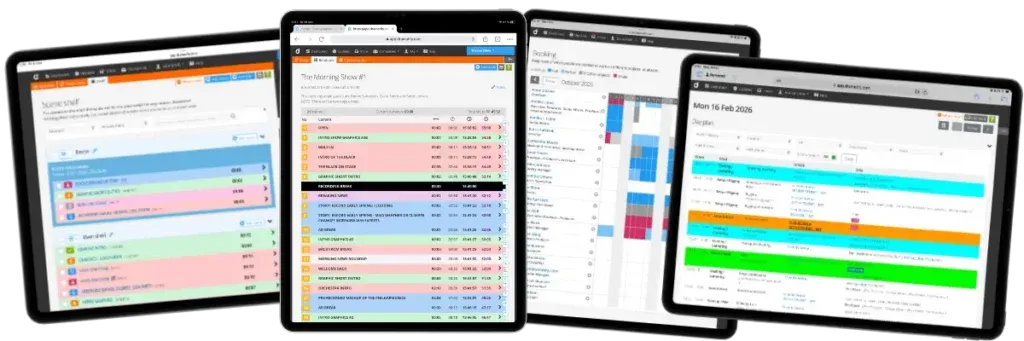
Planning & Scheduling
Overview production planning, company-wide resource booking and asset management, cast scheduling and crew planning operate within the same system, ensuring that all departments work from aligned timelines.
Content Planning & Production
Editorial planning tools such as the Shelf allow teams to map out recurring segments and quickly define the format structure. Rundowns, outlines, and scripts can be copied and adapted for new productions, reducing the need to rebuild from zero each time. They also connect to graphics, cue cards and teleprompters. This ensures that changes in one part of the production are reflected across the rest of the workflow.
Daily operations
The day planner, or daily production schedule, provides a clear view of the shooting day. It connects directly to Dramatify’s personal dashboard, and optionally also to crew and cast digital calendars, helping teams stay aligned without additional coordination layers. Naturally, document and resource sharing along with team communication speeds up the process. Together, these elements create a shared production structure rather than a collection of separate documents.
Scaling formats across productions
When production systems match the structure of the format, TV format productions become more predictable and easier to scale. Teams can reuse proven workflows rather than recreate them. Communication becomes clearer. Fewer hours are spent aligning information across departments. This does not remove complexity from production, but it reduces unnecessary work.
Over time, this often leads to:
- lower cost per production
- faster production cycles
- reduced operational risk
Most importantly, it allows teams to focus more on editorial decisions rather than coordination.
What this means for executives
For producers, the impact is practical. Less duplication. Faster setup. More time for creative work.
For COOs and CEOs, the implications are financial. More efficient TV format production can improve margins and reduce the cost of delivering each production.
For CTOs, the shift is structural. Fewer disconnected tools. Better data continuity. A production infrastructure that can scale across multiple productions and teams.
Scale should reduce cost
TV format production is one of the few areas in television where scale should reduce cost. When companies stop treating each production as a new universe and start treating it as a variation of a structured system, efficiency becomes achievable.
Next: Book a demo or see how the workflow fits into your productions.
Other articles in the series
- AI Show Development That Drives Commission Wins
- Entertainment Production Workflows Beyond Spreadsheets
- Why Digital Entertainment Rundowns Don’t Break Live
- The Innovative Shift in Live Entertainment Rundowns
- 5 Proven Eurovision Qualifier Production Lessons
- 5 Powerful Entertainment Rundown Templates That Scale Shows
 1
113 Feb 2026
AI Show Development That Drives Commission Wins
 2
217 Feb 2026
Entertainment Production Workflows Beyond Spreadsheets
 3
324 Feb 2026
Why Digital Entertainment Rundowns Don’t Break Live
 4
43 Mar 2026
The Innovative Shift in Live Entertainment Rundowns
 5
56 Mar 2026
5 Proven Eurovision Qualifier Production Lessons
 6
613 Mar 2026
5 Powerful Entertainment Rundown Templates That Scale Shows
 7
715 Apr 2026
Proven TV Format Production That Cuts Costs at Scale
Reading now 8
825 Apr 2026
The Powerful Talent Show Production Workflow Behind Hit Formats
 9
99 Jul 2026
Inside Reality Show Production Workflows