Why Digital Entertainment Rundowns Don’t Break Live
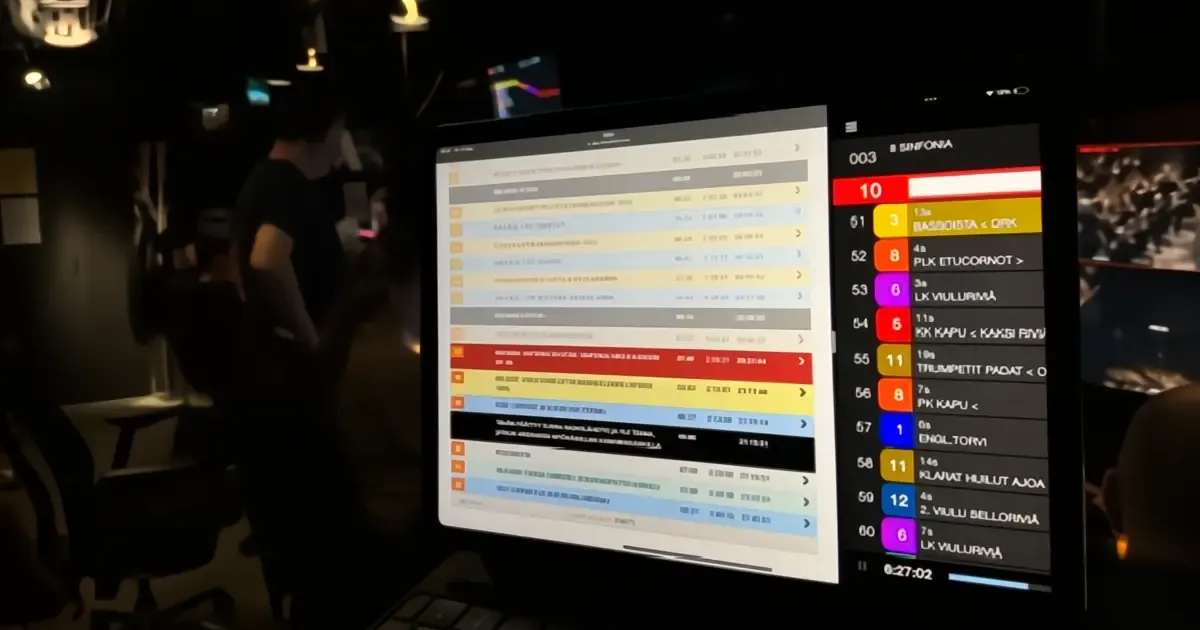
Live entertainment puts extreme pressure on rundowns. Timing shifts, content changes and parallel cues expose weaknesses in traditional tools. Digital entertainment rundowns are built to absorb that pressure without breaking.
This article is part of a six-part series on modern entertainment production, published alongside a Nordic broadcaster’s sixth (2026) season of producing the Eurovision qualifier on Dramatify.
Live is where theory meets reality
In theory, every rundown works. Segments are in the right order. Timing is close enough. Scripts are prepared. Cues are planned. On paper, the show makes sense.
During rehearsal, there may be some glitches and changes. That is natural. Live broadcast is different.
Artists stumble. Live interviews overrun. Applause runs long. Jury decisions arrive late. Editorial choices change in real time. What looked stable in rehearsal becomes fluid under pressure. This is where many traditional entertainment rundowns begin to struggle.
Why pressure exposes structural limits
Live pressure does not create problems on its own. It reveals them. When rundowns are built as static documents, every change becomes a manual operation. A timing adjustment in one place must be reflected elsewhere. Script changes need to be communicated verbally. Cues are updated separately. Different teams see different versions.
Each step adds friction. Under live conditions, friction becomes risk.
Entertainment rundowns are not just editorial tools
An entertainment rundown is not only for producers. It is used simultaneously by production coordinators, creative departments, presenters, technical directors, camera operators, graphics operators and stage managers. Each role needs a different level of detail, but all rely on the same underlying structure.
When that structure cannot adapt in real time, teams compensate with experience, calls and intuition. That works until scale or complexity increases.
What digital entertainment rundowns do differently
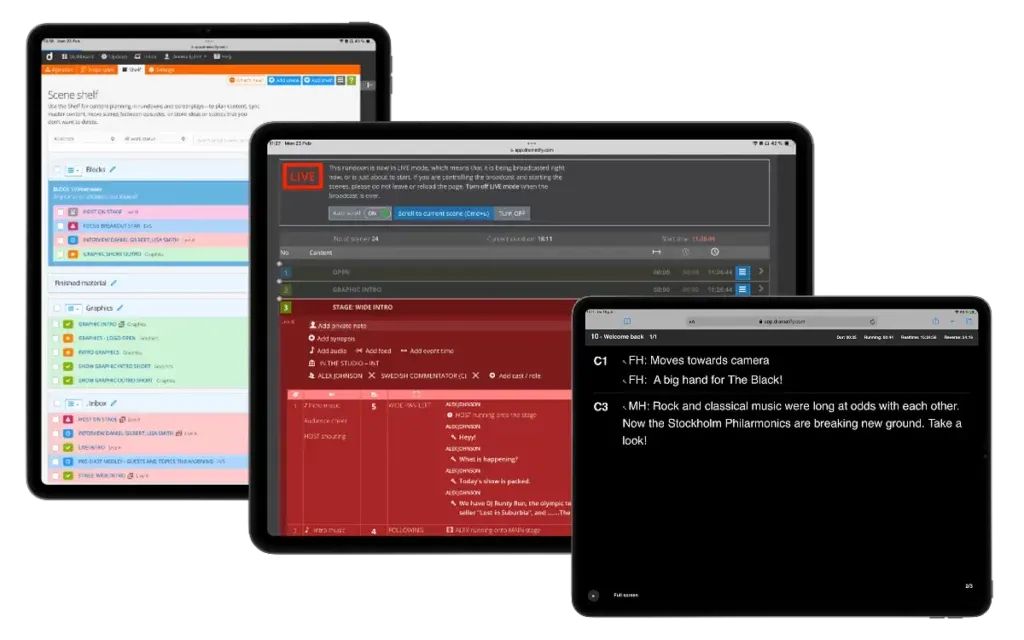
Dramatify’s digital entertainment rundowns are designed for change. They treat timing, scripts, cues and segments as connected elements rather than fixed text. When something changes, the impact is visible immediately across the rundown. This makes it possible to adjust content on the fly without losing sight of the big picture or forcing teams to rely on memory and verbal updates.
They are also integrated with supporting features, including planning, scheduling, budgeting, team management, creative department support, and reporting.
Multiple views, one shared truth
One reason digital rundowns hold under pressure is that they support different roles without fragmenting information.
Production coordinators can focus on timing and flow. Presenters see scripts and cues. Technical teams track camera and graphics execution. Operators see what they need, when they need it.
Everyone works from the same source, but through views adapted to their role.
Running the show from the rundown
In modern entertainment production, the rundown is not only a reference. It is the control layer. Rehearsals and live broadcasts can be run directly from the digital rundown. Changes to content or timing may be made during the show, depending on outcomes, audience response, or editorial decisions.
This reduces reliance on parallel notes, last-minute printouts or whispered instructions in the gallery.
Optional AI support during live production
Some productions also use AI support both during pre-production and execution. This can include assisting hosts or anchors with facts and quotes, updated wording, finding new, fresh intros, transitions or explanations when the running order changes unexpectedly. Used carefully, this helps presenters stay aligned and fresh without increasing cognitive load.
AI does not run the show. It supports the people who do.
Why this matters at scale
As entertainment productions grow in scale, complexity and distribution, tolerance for breakdown decreases. Audiences expect polish. Broadcasters expect control. Production teams need systems that support them under pressure, not tools that require perfect conditions.
Digital entertainment rundowns do not remove pressure. They are built to survive it.
When change is the norm
Live entertainment will always be unpredictable.
The difference is whether the rundown amplifies that unpredictability or absorbs it. Digital entertainment rundowns are designed for the reality of live broadcast, where change is not an exception but the norm.
Next: Book a demo or see how the workflow fits into your productions.
Other articles in the series
 1
113 Feb 2026
AI Show Development That Drives Commission Wins
 2
217 Feb 2026
Entertainment Production Workflows Beyond Spreadsheets
 3
324 Feb 2026
Why Digital Entertainment Rundowns Don’t Break Live
Reading now 4
43 Mar 2026
The Innovative Shift in Live Entertainment Rundowns
 5
56 Mar 2026
5 Proven Eurovision Qualifier Production Lessons
 6
613 Mar 2026
5 Powerful Entertainment Rundown Templates That Scale Shows
 7
715 Apr 2026
Proven TV Format Production That Cuts Costs at Scale
 8
825 Apr 2026
The Powerful Talent Show Production Workflow Behind Hit Formats
 9
99 Jul 2026
Inside Reality Show Production Workflows