Meet the contact manager – built for how productions actually work
Jan 20, 2026 | features & releases

Every production leaves a trail of people behind it. Great location managers. Reliable fixers. That one accommodation provider who saved the shoot at the last minute. The studio contact who always answers the phone.

And then the project wraps. The team disperses. The spreadsheet lives on someone’s laptop. And six months later, you’re starting from zero again.

That’s the problem Dramatify’s Production Contact Manager is designed to solve.

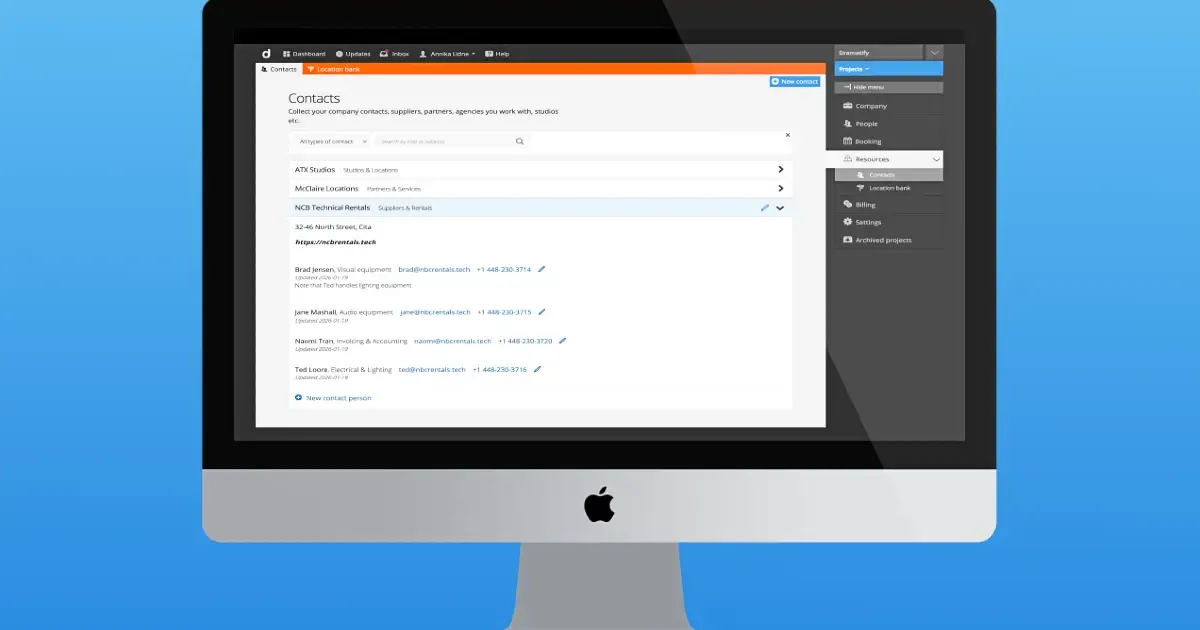
It’s not another address book. It’s a production-aware contact system that quietly builds long-term knowledge while your teams do their everyday work.

A production contact manager list that stays with the company, not the crew

In film, TV, video and broadcast production, teams change constantly. Freelancers come and go. Short-term contracts end. Entire productions wrap and disappear.

But your relationships shouldn’t.

Dramatify’s Production Contact Manager creates a company-wide contact list that stays with your organisation across productions. Contacts are collected automatically as they’re used in real projects, meaning:

  • No extra admin work
  • No separate data entry
  • No “who worked with them last time?” emails

Suppliers, agencies, venues, accommodation providers and location contacts quietly accumulate into a shared knowledge base your teams can reuse again and again.

For C-suite leaders, that means continuity and reduced risk. For producers, it means speed and confidence.

Contacts connected to real production work

Unlike traditional contact tools, contacts in Dramatify don’t live in isolation. They’re attached directly to locations and assets, exactly where they’re needed during production. When a location is added, the relevant contact is added. When an asset is booked, the supplier comes with it.

From there, Dramatify automatically does the rest. Every contact added in a project becomes part of the company-wide contact list, making it instantly available to future productions without copying, exporting or chasing files.

It’s one of those features that feels invisible, right up until you realise how much friction it removes.

Why spreadsheets and corporate contact tools fall short

Many production companies still rely on a mix of spreadsheets, personal address books, and corporate tools like Google Contacts, Outlook or Teams. In theory, they work. In practice, they rarely survive real-world production.

Freelancers don’t always have corporate logins. Personal tools can’t be shared or controlled. Spreadsheets go out of date the moment someone forgets to update them.

By keeping contacts inside the production system itself, Dramatify avoids all of that.

Contacts follow production permissions, stay linked to real production objects, and remain accessible even as teams change. The system adapts to how productions are staffed, not the other way around.

Clear access, clear control

Production teams need flexibility. Management needs oversight. Dramatify balances both.

Contacts can be attached in projects by users with the right project access, while editing and permanent deletion are handled deliberately at company level. Company administrators control who can manage the shared contact database, ensuring consistency without slowing teams down.

The result is a contact system that feels easy on set and robust at board level.

Built into the wider production workflow

The Production Contact Manager isn’t a standalone feature. It’s part of the wider Dramatify ecosystem.

Because contacts are linked to locations, assets, schedules and reports, they naturally appear wherever they’re needed across the production workflow. That integration is what turns contacts from static data into living production knowledge.

All of it lives inside Dramatify, used daily by production companies and broadcasters to run complex productions with fewer tools and fewer handovers.

Frequently Asked Questions

Production Contact Manager

  • What is production contact management software?

    It’s a system designed specifically for film, TV, video and broadcast production that stores suppliers, partners and location contacts in direct connection to real production work. In Dramatify, contacts are shared across productions and linked to locations and assets, not kept in personal or generic corporate tools.

  • How is this different from Google Contacts or Outlook?

    Traditional contact tools assume stable teams and corporate logins. Production teams are fluid. Dramatify keeps contacts inside the production environment, applies production-specific access rules, and works across freelancers, short-term staff and long-running organisations.

  • Can contacts be reused across multiple productions?

    Yes. Any contact added in a project is automatically included in the company-wide contact database, allowing approved suppliers and partners to be reused across future productions.

  • Who can edit or delete contacts?

    Company administrators and authorised team members manage company-wide contacts. Project users can attach contacts during production, but permanent changes are handled at company level for consistency and control.

  • Can a contact include both a company and individual people?

    Yes. Contacts can represent a company and include multiple people, reflecting how suppliers, agencies and partners typically operate in production and broadcasting.

0 Comments

Submit a Comment

Your email address will not be published. Required fields are marked *

This site uses Akismet to reduce spam. Learn how your comment data is processed.

WORKFLOWS

Film & Drama

From screenplay import to semi-automatic call sheets and DPRs!

Entertainment

Explore our innovative rundown suite with smart integrations.

Sports

Game on! Cover sports in the field with a premier mobile solution!

Talk Shows & Current Affairs

Easily collaborate from wherever your cast and crew are!

Factuals & Documentaries

3 different script formats, made for remote co-productions!

Children's programmes & Kid's shows

Produce any kind of kid's content with specific features for children on set!

Social media, commercials & corporate video

Image-based scripts to easily express your vision!

Management & Budgeting

Manage your production, budget, team and all details in one place.

Planning & Scheduling

With a powerful scheduling suite from a helicopter view to minute details, you have complete control..

Content & Creative

Creative teams excel with Dramatify, from scripts to location scouting.

Broadcast & Integrations

From live broadcasting to smart integrations, Dramatify evolves with your productions

Key features

AI Services

Super-charge development with AI!

Resource Booking

Company-wide booking of staff, team, crew and cast.

Production Dashboard

Everything at a glance across productions!

Budgeting

Smart, integrated easy-to-use budgeting for any kind of production!

Cast & Crew Management

From interactive team lists to integrations with scheduling!

Rundowns for Multi-Camera

Integrated with cue cards, CuePilot, teleprompters and all our features!

Drama Screenplays

Import/synch with Final Draft/.fdx, automatic script sides and automatic watermarking!

Image-based AV Scripts

The perfect format for branded content and storyboards!

Story Shelf

Plan, store & bounce scenes - super useful from drama to big sports events!

Script Breakdown

Smart script breakdown, including optional partial access for creative departments.

Production Planner

Visual production planning from idea to distribution.

Shooting Scheduling

Powerful scheduling integrated with cast DooD and all other scheduling features.

Daily Production Schedules

Ditch spreadsheets! Smart, integrated daily production schedules with powerful features. 

Semi-Automatic Call Sheets

Integrated call sheets that writes themselves as details are added elsewhere. For print and mobile!

Set Design & Scenography

From auto set lists, images and breakdown to 3D files and set details!

Locations

With images, maps & automatic weather reports and much more!

Character Management

Auto-lists with automatic statistics, booking sheets, stripboards and more!

Wardrobe

Inspo images, measurements, breakdown, wardrobe lists and more!

Makeup & Hair

Integrated makeup & hair functionality with looks, cleanface, makeup charts and more!

WHY DRAMATIFY?

Overview

A production tool for all your company's productions.

Saving time & money

How Dramatify minimise risk and saves your production time and money every day.

For Producers & Production Managers

Plan and track productions, the content, cast & crew.

For creatives

Smart, integrated tools for the creative crew, from ADs to wardrobe designers, set designers and makeup artists.

For crew

Find tools and information according to your role and access level in the production.

For cast members

How to use Dramatify for cast members, including actors, anchors and hosts.

WORKFLOWS

Drama

From screenplay import to semi-automatic call sheets - Dramatify helps you run a tight production.

Entertainment

Enjoy Dramatify's innovative rundown suite with a plethora of smart integrations.

Sports

Integrated features for both large event planning, and scripted and semi-scripted shows.

Talk Shows & Current Affairs

Plan, write and produce talk shows & current affairs shows.

Factuals & Documentaries

With 3 different script formats, start with the one fitting your project's particular needs.

Social media, commercials & corporate video

Use the same tools as the industry professionals for your productions.

Broadcasting & live streaming

Productions powered by Dramatify reaches millions of viewers a week. Join our growing list of broadcasters!

Graphic audio

From script breakdown to recording scheduling and cast and crew booking, we handle enhanced audio productions.

PLANS

Free plan

3 active users for basic drama & documentary pre-production.

Bronze plan

Starter plan for small productions & production companies

Silver plan

for up to 25 active users + unlimited productions, cast & crew.

Gold plan

MOST POPULAR with up to 50 active users + unlimited productions, cast & crew.

Platinum plan

for companies & broadcasters with up to 100 active users + unlimited productions, cast & crew.

Enterprise

Contact us for a custom deal that suits your needs!

Education

Free plans for professional industry schools & educations!

Resources

Quick Start Guide

Quickly get started with your production!

Add & manage team members

Add crew and cast members, set permissions & allow access.

Add episodes & work with series

The episode functionality is super useful - even for features!

Working with rundowns

How to create rundowns for multi-camera live & studio productions.

How to work with screenplays

How to import/synch with Final Draft/.fdx, write natively and work with updates.

Working with image-based AV scripts

How to make the most out of the AV scripts.

Working with script breakdown

How to breakdown your script regardless of script format.

Working with scene items

From props to vehicles - here is how to work with scene items!

How to schedule your production

Powerful scheduling integrated with call sheets and other features.

How to schedule crew

How to work with crew scheduling, integrated with call sheets, time sheets and DPR.

Working with cast scheduling

Smart integration with scene scheduling, Daily Cast Schedule, DooD, stylists' scheduling & call sheets and more!

Creating call sheets

Call sheets almost write themselves - for mobile and print!

Working with sets & scenography

Breakdown, link to locations, share images, 3D files, add props, scene items and continuity.

Adding & working with locations

With images, releases, maps & automatic weather reports and much more!

Working with cast, characters, wardrobe, makeup & hair

A walk-through of character lists & pages, scheduling, details, linking to cast and more.

Translate »