Integrated asset management and booking where production planning actually happens
Jan 29, 2026 | features & releases

Finally, integrated asset management and booking is here! Managing and scheduling assets have always mattered in production. Equipment, props, facilities, studios, vehicles, and technical resources. They are as critical as the people using them. Yet for a long time, assets have tended to live slightly off to the side of the real planning work, tracked in separate tools, spreadsheets, or systems that only show part of the picture. With the company-wide, integrated asset management and booking across productions, that separation is gone.

With this launch, that separation is gone.

Integrated asset management and booking in Dramatify now live inside the same production planning environment as people, schedules, and projects. Not as a bolt-on. Not as a parallel system. But as part of the same shared plan production teams already work in every day, ensuring seamless integration of asset management and booking.

Explore the feature: Production asset management software that keeps plans aligned as production moves

Planning works best when everything is visible together

In real productions, decisions are rarely made in isolation. When a schedule shifts, it affects more than call times. It affects editing rooms, cameras, studios, vehicles, and technical setups. Planning people without seeing assets, or assets without seeing people, forces teams to mentally connect dots that the system should handle for them.

By bringing Booking and assets directly into production planning, teams get a single, coherent view of availability across productions. People, equipment, and facilities are no longer planned in separate mental spaces. They are viewed, checked, and coordinated together, in context.

This makes everyday decisions faster and more confident. It becomes easier to match the right editor with an available editing suite, to see how a piece of equipment is shared across overlapping productions, or to understand at a glance where capacity still exists when plans start to move.
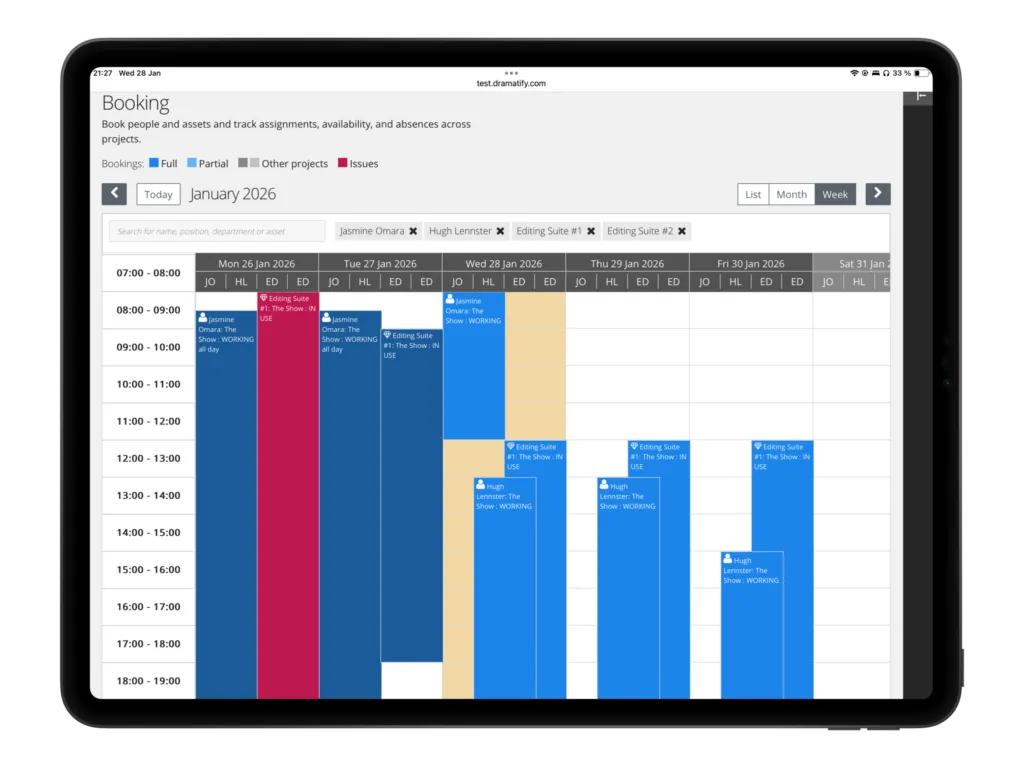
Production asset management software weekly booking view matching people and equipment availability

Company-wide assets, without losing production context

One of the challenges with assets is scale. As organisations grow, productions multiply, and resources are shared more widely, asset information tends to fragment. What exists centrally often loses relevance locally, and what works at the project level rarely scales across the company.

This release closes that gap.

Assets are managed centrally at the company level, creating a shared, reliable foundation. Booking then brings those assets directly into production schedules, where context matters most. Teams can see what is booked, what is partially used, and what is unavailable, not in abstraction, but in relation to the productions they are planning and the people involved.

The result is clarity without rigidity. A structure that supports multiple productions in parallel, without forcing teams into workarounds or duplicate tracking.
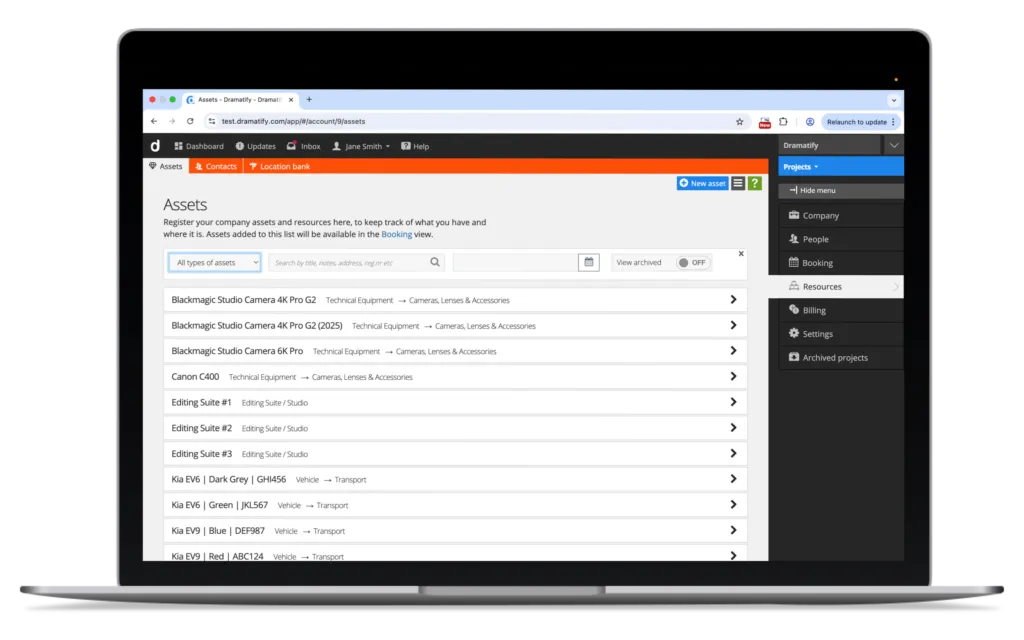
Production asset management software showing a company-wide asset directory with equipment, facilities, and production resources

Built for change, not just for plans on paper

Production plans change. That is not an edge case, it is the norm. The value of a planning system is not how well it represents the first version of a schedule, but how well it holds together when adjustments start to ripple through the day.

Because asset booking now sits inside the same planning layer as people and schedules, changes remain readable. When dates shift or resources move, teams can immediately see the implications across both people and assets, without reconciling information across tools or guessing availability.

This is not about adding more detail. It is about reducing uncertainty.

Integrated asset management and booking: A step forward for the platform

This launch completes an important part of Dramatify’s company-wide production workflow. Asset management and booking now sit naturally alongside staff, crew, cast, locations, and schedules, all within the same platform and planning logic.

If you’re also building out company-wide location workflows, the Location Bank fits neatly into the same “shared foundation, planned in context” approach.

For production teams, this means fewer blind spots, fewer handovers between systems, and a clearer shared understanding of how work is actually organised.

Asset management and booking now happen where production planning actually happens. And that makes the entire plan easier to trust.

Next: Book a demo or see how the workflow fits into your productions.


Photo credit: Dmitrii Shirnin/Unsplash

0 Comments

Submit a Comment

Your email address will not be published. Required fields are marked *

This site uses Akismet to reduce spam. Learn how your comment data is processed.

WORKFLOWS

Film & Drama

From screenplay import to semi-automatic call sheets and DPRs!

Entertainment

Explore our innovative rundown suite with smart integrations.

Sports

Game on! Cover sports in the field with a premier mobile solution!

Talk Shows & Current Affairs

Easily collaborate from wherever your cast and crew are!

Factuals & Documentaries

3 different script formats, made for remote co-productions!

Children's programmes & Kid's shows

Produce any kind of kid's content with specific features for children on set!

Social media, commercials & corporate video

Image-based scripts to easily express your vision!

Management & Budgeting

Manage your production, budget, team and all details in one place.

Planning & Scheduling

With a powerful scheduling suite from a helicopter view to minute details, you have complete control..

Content & Creative

Creative teams excel with Dramatify, from scripts to location scouting.

Broadcast & Integrations

From live broadcasting to smart integrations, Dramatify evolves with your productions

Key features

AI Services

Super-charge development with AI!

Resource Booking

Company-wide booking of staff, team, crew and cast.

Production Dashboard

Everything at a glance across productions!

Budgeting

Smart, integrated easy-to-use budgeting for any kind of production!

Cast & Crew Management

From interactive team lists to integrations with scheduling!

Rundowns for Multi-Camera

Integrated with cue cards, CuePilot, teleprompters and all our features!

Drama Screenplays

Import/synch with Final Draft/.fdx, automatic script sides and automatic watermarking!

Image-based AV Scripts

The perfect format for branded content and storyboards!

Story Shelf

Plan, store & bounce scenes - super useful from drama to big sports events!

Script Breakdown

Smart script breakdown, including optional partial access for creative departments.

Production Planner

Visual production planning from idea to distribution.

Shooting Scheduling

Powerful scheduling integrated with cast DooD and all other scheduling features.

Daily Production Schedules

Ditch spreadsheets! Smart, integrated daily production schedules with powerful features. 

Semi-Automatic Call Sheets

Integrated call sheets that writes themselves as details are added elsewhere. For print and mobile!

Set Design & Scenography

From auto set lists, images and breakdown to 3D files and set details!

Locations

With images, maps & automatic weather reports and much more!

Character Management

Auto-lists with automatic statistics, booking sheets, stripboards and more!

Wardrobe

Inspo images, measurements, breakdown, wardrobe lists and more!

Makeup & Hair

Integrated makeup & hair functionality with looks, cleanface, makeup charts and more!

WHY DRAMATIFY?

Overview

A production tool for all your company's productions.

Saving time & money

How Dramatify minimise risk and saves your production time and money every day.

For Producers & Production Managers

Plan and track productions, the content, cast & crew.

For creatives

Smart, integrated tools for the creative crew, from ADs to wardrobe designers, set designers and makeup artists.

For crew

Find tools and information according to your role and access level in the production.

For cast members

How to use Dramatify for cast members, including actors, anchors and hosts.

WORKFLOWS

Drama

From screenplay import to semi-automatic call sheets - Dramatify helps you run a tight production.

Entertainment

Enjoy Dramatify's innovative rundown suite with a plethora of smart integrations.

Sports

Integrated features for both large event planning, and scripted and semi-scripted shows.

Talk Shows & Current Affairs

Plan, write and produce talk shows & current affairs shows.

Factuals & Documentaries

With 3 different script formats, start with the one fitting your project's particular needs.

Social media, commercials & corporate video

Use the same tools as the industry professionals for your productions.

Broadcasting & live streaming

Productions powered by Dramatify reaches millions of viewers a week. Join our growing list of broadcasters!

Graphic audio

From script breakdown to recording scheduling and cast and crew booking, we handle enhanced audio productions.

PLANS

Free plan

3 active users for basic drama & documentary pre-production.

Bronze plan

Starter plan for small productions & production companies

Silver plan

for up to 25 active users + unlimited productions, cast & crew.

Gold plan

MOST POPULAR with up to 50 active users + unlimited productions, cast & crew.

Platinum plan

for companies & broadcasters with up to 100 active users + unlimited productions, cast & crew.

Enterprise

Contact us for a custom deal that suits your needs!

Education

Free plans for professional industry schools & educations!

Resources

Quick Start Guide

Quickly get started with your production!

Add & manage team members

Add crew and cast members, set permissions & allow access.

Add episodes & work with series

The episode functionality is super useful - even for features!

Working with rundowns

How to create rundowns for multi-camera live & studio productions.

How to work with screenplays

How to import/synch with Final Draft/.fdx, write natively and work with updates.

Working with image-based AV scripts

How to make the most out of the AV scripts.

Working with script breakdown

How to breakdown your script regardless of script format.

Working with scene items

From props to vehicles - here is how to work with scene items!

How to schedule your production

Powerful scheduling integrated with call sheets and other features.

How to schedule crew

How to work with crew scheduling, integrated with call sheets, time sheets and DPR.

Working with cast scheduling

Smart integration with scene scheduling, Daily Cast Schedule, DooD, stylists' scheduling & call sheets and more!

Creating call sheets

Call sheets almost write themselves - for mobile and print!

Working with sets & scenography

Breakdown, link to locations, share images, 3D files, add props, scene items and continuity.

Adding & working with locations

With images, releases, maps & automatic weather reports and much more!

Working with cast, characters, wardrobe, makeup & hair

A walk-through of character lists & pages, scheduling, details, linking to cast and more.

Translate »