
Every production builds its own world, but the real magic often lives in the notes you made last time: the exact address that actually worked, the contact who picked up, the gate code, the parking workaround, the power supply, or the one thing you promised yourself you would remember.
The Dramatify Location Bank turns that hard-won knowledge into a searchable filming locations database your whole company can reuse, so finding location details does not require reopening old projects, digging through emails, chasing old call sheets, or relying on someone’s memory.
And because productions rarely run one at a time, the Location Bank is designed to work across projects and teams. It supports the way film, TV, entertainment, and broadcast organisations operate day to day: multiple productions, shifting schedules, evolving location choices, and constant handovers. In short, it is production location management built to travel with your company, not get stranded inside a single project.
Why a shared filming locations database matters
Locations are not just places. They are decisions, constraints, permissions, and relationships. When location information is scattered across spreadsheets, emails, and archived documents, teams waste time searching, retyping, and re-checking details that were already solved on a previous production.
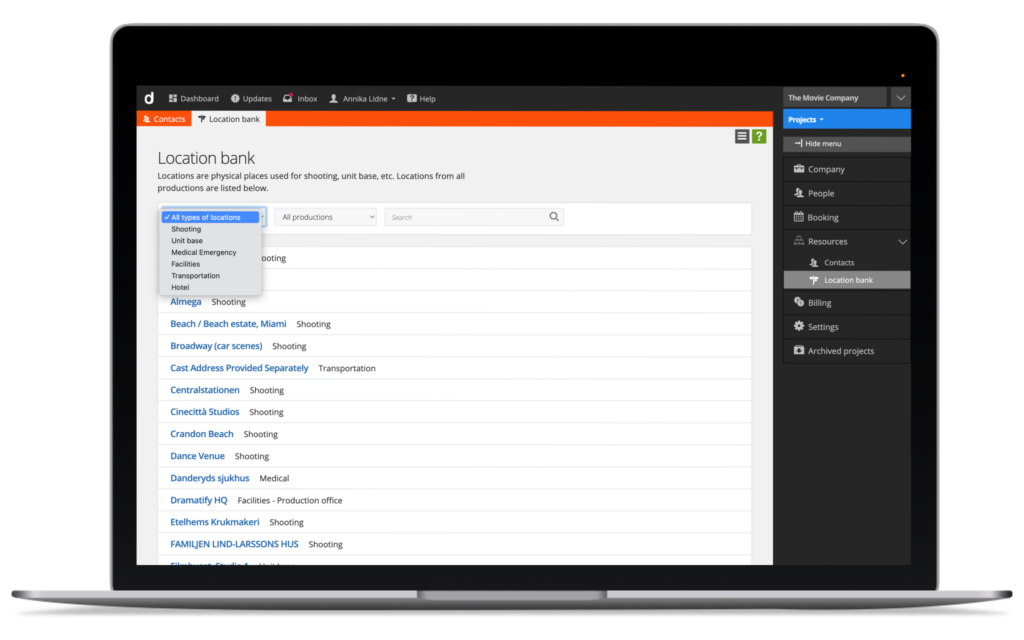
The Location Bank gathers your company’s locations into one shared view, so you can:
- Search and quickly retrieve details about past filming locations
- Reuse trusted locations across new productions without rebuilding the same information
- Keep core location information consistent across teams and departments
- Reduce last-minute uncertainty by making location knowledge easier to access
- Works for shooting locations, studios, venues, arenas, unit bases, facilities, transport hubs, accommodations and medical emergency locations.
Built for real production workflows, not perfect data
Locations rarely arrive “complete”. Most productions start with placeholders such as “Main venue”, “Beautiful beach”, “Mom’s kitchen”, or “Studio B”. Details are added as scouting progresses: the address, the right contact, access notes, photos, and what to avoid.
The Dramatify Location Bank is designed to support this iterative reality. You can create locations early, refine them over time, and keep improving the information as the production evolves. For shooting locations, you can also attach alternative options while scouting, so your team stays flexible without losing track of what was considered.

Find past locations without reopening old productions
Most teams have felt this: you know you shot there before, but you cannot remember which production it was, or where the final details ended up.
The Location Bank makes it easier to search your company’s historical locations in one place. Instead of digging through old project folders, exports, or call sheets, teams can find addresses, contacts, and practical notes faster, then apply that knowledge to the current production.
Designed to work across productions and departments
Dramatify is built for production companies and broadcasters managing multiple productions over time. That is why the Location Bank is a company-level feature rather than a project-only list.
In practice, this means locations added in projects can be collected into your company’s shared Location Bank, helping you build continuity across productions while still letting each project team work at its own pace. It is a simple idea with big consequences: your location knowledge compounds instead of disappearing into archives.
Naturally, you can set individual access rights to restrict access to your valuable company information.
Location information where it is actually useful
Because locations are integrated into Dramatify, they do not just sit in a database. They appear throughout production planning and reporting, where teams need them in context. That reduces duplicate work and helps keep information aligned across departments.
For many productions, the real benefit is not “more data”. It is fewer moments of unnecessary uncertainty. Fewer messages asking for the same details again. Fewer re-checks. Fewer avoidable mistakes.
Explore the Location Bank
If you want a quick overview of how locations work inside Dramatify, visit our short overview of production location management software.
If you would rather see the Location Bank in action, book a demo and we will walk through how teams can search past filming locations, reuse trusted location information, and manage locations across multiple productions.
Explore features: Production location management software
Book a demo: See the Location Bank in action
FAQ: Location Bank and filming locations database
What is a filming locations database?
A filming locations database is a searchable collection of locations your team has used or is considering, along with key details such as addresses, contacts, and practical notes. In Dramatify, the Location Bank acts as your company’s shared filming locations database, automatically adding and syncing locations added to productions in a single place, helping teams reuse location knowledge across productions.
How is the Location Bank different from a location list inside a single project?
A project location list only helps within that production. The Location Bank is designed to support cross-production work, so your organisation can find and reuse locations over time instead of starting from scratch in every new project.
Can we store more than just addresses in the Location Bank?
Yes. Locations are managed iteratively, so teams can add and refine practical information over time, such as the right contact person, notes about access, and other production-relevant details. Learn more about the information you can add to Locations.
Does this replace location scouting documents and spreadsheets?
Yes, for many teams, it reduces the need for separate documents by keeping location information in one shared place that connects to the rest of the production workflow. The goal is less double work, fewer exports, fewer duplicates, and easier retrieval of location details when planning.
Can we reuse locations from past productions?
Yes. One of the main benefits is making it easier to search past filming locations and reuse proven location information in new productions, including returning series, recurring formats, and regular sports coverage.
Is the Location Bank only for shooting locations?
No. The Location Bank supports multiple location types commonly used in film and TV production, such as shooting locations, unit bases (production offices), service facilities, storage locations, accommodation, transport hubs, and medical emergency locations.
Who can access and manage the Location Bank?
Access depends on permissions. In general, users need the appropriate production Locations permissions to view and manage locations. To view and edit locations in the Location Bank, company-level location access or business account administrator access is required. This helps organisations keep location data consistent and secure while still enabling collaboration across projects.
How does this support production companies and broadcasters working across many productions?
It centralises location knowledge so it does not get trapped in individual projects. That makes it easier for teams to standardise location information, retrieve location information after production freelancers leave upon finishing a project, onboard new crew faster, and maintain continuity across multiple productions over time.
0 Comments